
AI Expense Tracker — Auto-Scan & Categorize Every Receipt
Last updated: May 2026
Snap a receipt, forward an email, or connect Gmail — this AI receipt scanner reads every detail and populates your spreadsheet automatically. Vendor, amount, date, tax, category. Zero manual entry.
Join 2,500+ businesses already using AI-powered expense tracking
You'll sign in with Google next — takes 30 seconds, read-only access.
60-day free trial · No credit card · Cancel anytime
Available in ChatGPTGet it on ChatGPTAvailable in ClaudeGet it on ClaudeWatch: AI reads a receipt in 5 seconds
How the AI Receipt Scanner Works
Three steps. No app to install, no photos to organize, no data entry.
Connect Gmail
Sign in with Google and the AI receipt scanner goes to work immediately. It scans as far back as your Gmail goes and finds every receipt — Amazon orders, Uber rides, SaaS renewals, hotel bookings, and hundreds more. No forwarding, no manual uploads. Our Gmail receipt scanner runs automatically overnight so new receipts are captured daily.
AI Reads Every Receipt
The AI receipt scanner extracts vendor name, transaction amount, date, tax breakdown, and expense category from every receipt — photos, PDFs, screenshots, and emails. It handles crumpled thermal paper, faded ink, foreign languages, and multi-page invoices. Accuracy sits at 99.5% across 19,000+ receipts processed in the last 30 days.
Everything Lands in Your Google Sheet
Every scanned receipt becomes a row in your own Google Sheets spreadsheet — organized by date, categorized into tax-ready line items (Schedule C, T2125), with receipt images linked in Google Drive. Add your own formulas, filters, or pivot tables. Need a starter spreadsheet? Grab our free expense tracker template to see the format.
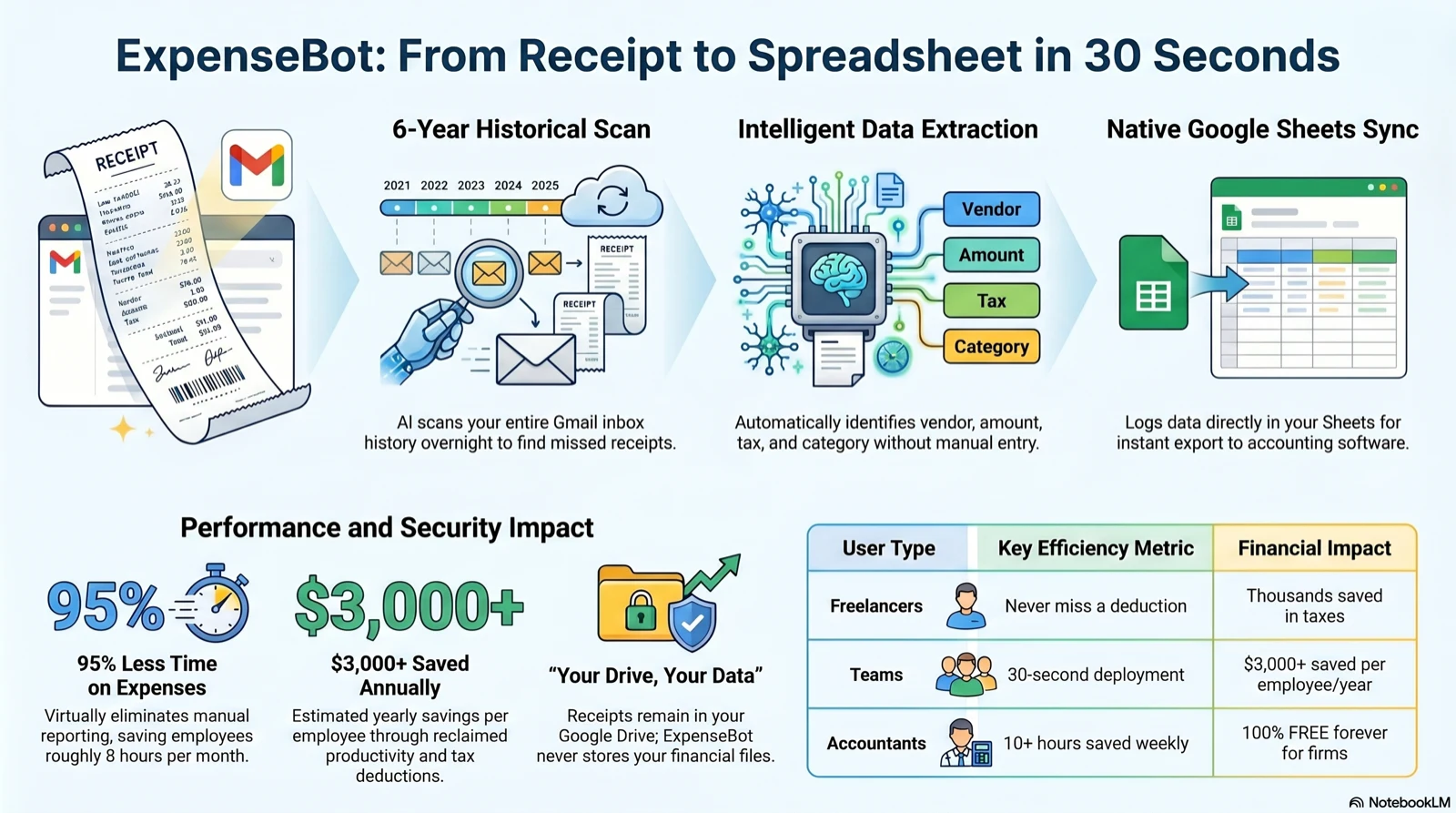
The full AI receipt-to-spreadsheet pipeline — Gmail scan → data extraction → your Google Sheet
What Makes This Different from Other AI Receipt Scanners
Most receipt scanners make you do the work. This one doesn't.
Works Inside Gmail
No app switching, no photo uploads needed. The AI scans your inbox directly and finds receipts you forgot about — including ones buried in forwarded threads and attachments.
Your Records Stay in YOUR Google Drive
Durable receipt files and spreadsheets live in your own Google Drive. You own those files and can access them without an ExpenseBot subscription.
Your Full Email History
Most receipt scanners only work going forward. ExpenseBot scans backwards through your full Gmail history, recovering receipts you never knew you had.
Real Tax Categories, Not Generic Labels
Expenses are categorized into actual tax lines — Schedule C for US freelancers, T2125 for Canadian self-employed, BAS for Australian businesses. Not just 'Food' and 'Travel'.
99.5% Accuracy at Scale
19,000+ receipts processed in the last 30 days at 99.5% accuracy. The AI handles thermal paper, handwritten amounts, foreign currencies, and multi-page invoices without breaking a sweat.
See how ExpenseBot compares to other options in our best receipt scanner apps roundup.
What AI Does That You Shouldn't Have To
Every receipt becomes a spreadsheet row — automatically. Here's what the AI handles:
Reads Receipts
AI reads photos, PDFs, screenshots, and email receipts — even crumpled, blurry, or faded thermal paper. No typing required.
Extracts Every Detail
Vendor name, transaction amount, date, tax breakdown, payment method, and tip — all extracted automatically by AI.
Categorizes to G/L Accounts
AI auto-categorizes each expense to the correct general ledger account. It learns your patterns and gets smarter over time.
Converts Currencies
Foreign receipts? AI detects the currency and converts it to your home currency using the exchange rate on the receipt date.
Scans Gmail Overnight
Connect Gmail and AI scans your inbox automatically — finds receipts from Amazon, Uber, airlines, hotels, and subscriptions.
Generates Tax Reports
Year-end tax report with expenses organized by category, deduction summaries, and tax form line references (Schedule C, T2125).
AI Expense Tracking vs Manual Entry
See why thousands of businesses switched from manual expense tracking to AI-powered automation.
At 50 receipts/month × 2 min each = 100 minutes saved. That's over 1.5 hours for $10/month.
6 Ways AI Captures Your Receipts
Every method triggers AI extraction — vendor, amount, date, tax, category. For vendor invoices specifically, invoice capture software covers where the extracted invoice lands in QuickBooks.
Gmail Auto-Scan
AI reads receipts from inbox overnight
Google Photos
Bulk import 100+ receipt photos
PDF Upload
Drag & drop invoices and PDFs
Snap a Photo
Camera in browser, AI reads instantly
Screenshots
Paste or upload — AI extracts all
Forward Email
Send to receipts@expensebot.ai
How AI Expense Tracking Works — Under the Hood
ExpenseBot uses multiple AI models working in sequence to turn raw receipts into clean, categorized spreadsheet rows.
OCR Receipt Scanning
Every receipt — photo, PDF, screenshot, or email — is processed by AI-powered Optical Character Recognition. Unlike basic OCR that just reads text, ExpenseBot's AI understands receipt layouts. It identifies where the vendor name sits, where the total is, how tax lines are structured, and where the date appears — even on crumpled, faded thermal paper or receipts photographed at an angle.
Supports 50+ languages, handwritten amounts, itemized line items, and multi-page invoices.
Auto-Categorization with Machine Learning
Once data is extracted, the AI categorizes each expense to the correct general ledger (G/L) account. It uses the vendor name, transaction amount, and context to determine the category — Office Supplies, Travel, Meals & Entertainment, Software Subscriptions, and more. The AI learns from your corrections and adapts to your specific chart of accounts over time.
Maps directly to Schedule C, T2125, BAS, and other tax form line items.
Gmail Parsing & Overnight Scanning
Connect your Gmail or Google Workspace account and ExpenseBot's AI scans your inbox automatically every night. It identifies transactional emails from Amazon, Uber, Lyft, airlines, hotels, SaaS subscriptions, and hundreds of other vendors. The AI distinguishes actual receipts from marketing emails, shipping notifications, and order confirmations — only real expenses make it to your spreadsheet.
Subscription scans up to 3 Gmail accounts with 2 years of historical receipt recovery.
Bank Statement Reconciliation
Upload a credit card or bank statement (PDF or CSV) and the AI matches each transaction to a receipt already in your spreadsheet. It handles fuzzy matching — 'AMZN MKTP US' matches to your Amazon receipt, 'SQ *COFFEE SHOP' matches your Square receipt. Unmatched transactions are flagged for review so nothing slips through the cracks.
Supports all major banks, credit cards, and statement formats.
Multi-Currency Conversion
The AI detects the currency on each receipt and automatically converts to your home currency using the exchange rate from the transaction date — not today's rate. This is critical for accurate tax reporting on business travel expenses. It handles currency symbols, written currency names, and mixed-currency invoices.
50+ currencies supported with historical exchange rate lookup.
What ExpenseBot's AI Catches That You'd Miss
Manual tracking means human errors. AI doesn't forget, doesn't skip, and doesn't get tired at 11pm during tax season.
Duplicate Charges
The AI flags when the same vendor, amount, and date appear twice — whether from a double-swipe at the register or an accidental double-upload. It catches duplicates across all capture methods: Gmail, photos, PDFs, and manual uploads.
Miscategorized Expenses
A $200 charge at 'Office Depot' looks like Office Supplies — but the receipt shows printer ink cartridges (Equipment). The AI reads the actual line items, not just the vendor name, to categorize accurately.
Receipts Buried in Email
That SaaS renewal confirmation from 6 months ago? The hotel booking receipt in a forwarded thread? AI scans your entire Gmail history and surfaces receipts you forgot existed — including ones in nested replies and attachments.
Forgotten Subscriptions
Monthly charges for tools you stopped using — Slack seats, unused domains, old SaaS trials that converted to paid. The AI spots recurring charges and surfaces them so you can cancel what you don't need.
Missing Tax Deductions
That Uber ride to a client meeting? The coffee with a prospect? The phone case for your business phone? Small expenses add up. AI captures every receipt — even the $4 ones — so you claim every legitimate deduction.
Statement Mismatches
Your credit card says $127.43 but the receipt says $124.52. The AI flags amount discrepancies between bank statements and receipts — catching tips added after signing, currency conversion differences, and billing errors.
Ready to Let AI Handle Your Expenses?
Set up your AI expense tracker in 30 seconds — no credit card required.
Start AI Expense Tracking — Free →How AI Expense Tracking Works
Connect Google
Sign in with your Google account. ExpenseBot creates a spreadsheet in your Google Drive, where your durable expense records remain under your control.
AI Captures Receipts
Snap photos, connect Gmail for overnight scanning, bulk import from Google Photos, or drag & drop PDFs. AI processes every receipt automatically.
AI Extracts & Categorizes
AI reads each receipt and extracts vendor, amount, date, tax, and payment method. Then it auto-categorizes to the correct G/L account.
Review in Google Sheets
Every expense becomes a row in your familiar Google Sheets. Add formulas, filters, pivot tables, or custom columns — your spreadsheet, your way.
AI Generates Reports
Year-end tax report, expense summaries by category, one-click export to QuickBooks, Xero, Sage, or CSV. AI does the heavy lifting at tax time.
Email Receipts to Spreadsheet Automatically
Last updated: April 2026
The single most-requested workflow from freelancers and solo business owners: email receipts to spreadsheet. Drop a receipt email in Gmail, watch it land as a structured row in Google Sheets — vendor, date, total, tax, category — without you copying anything. ExpenseBot turns every email receipt to spreadsheet row automatically, overnight, using a Gemini-powered scanning pass over your inbox.
Here's what happens when you email receipts to spreadsheet with ExpenseBot: (1) The overnight Gmail scan finds every message that looks like a receipt — Amazon order confirmations, Uber trip receipts, SaaS renewal notices, airline e-tickets, hotel folios, restaurant digital receipts. (2) The AI extracts vendor, date, currency, total, tax, and line items. (3) Each receipt becomes a new row in your Google Sheet — the same sheet you'd build by hand, but filled in automatically. For US filers, categories map to Schedule C line items. For Canadian filers, they map to T2125 lines. For other countries, custom categories.
This is the fastest way to turn Gmail into structured expense data. Pair it with our Google Sheets expense tracker or our Gmail receipt scanner to see the full workflow. For standalone manual tracking, the free expense tracker template for Google Sheets is a solid starting point that ExpenseBot can auto-fill once you connect Gmail.
What's New in the AI Expense Tracker for 2026
- Gemini 2.5 receipt OCR now supports 47 languages, with full extraction accuracy on non-Latin scripts (Japanese, Chinese, Arabic, Korean)
- Apple Wallet receipt import is live — pair ExpenseBot with Apple Wallet and any receipt stored there lands in your sheet automatically
- 2026 IRS mileage rate ($0.76/mile) and 2026 CRA per-km rate (73¢/km first 5,000 km) applied automatically to mileage entries
- HUD medical expense worksheet — new specialized report for HUD-assisted tenants tracking the medical expense deduction
- MCP server exposes ExpenseBot as a tool for AI assistants and developer integrations — connect Claude Desktop, Cursor, or any MCP-compatible client in minutes
AI That Reads What Humans Struggle With
ExpenseBot's AI handles the receipts you dread most — crumpled paper, faded thermal prints, foreign languages, and multi-page invoices. It processes hotel folios, restaurant receipts with tip calculations, and itemized invoices with line-by-line detail.
ExpenseBot is an AI expense tracking tool that reads receipts from Gmail, photos, and PDFs, and connects to ChatGPT, Claude, and MCP-compatible assistants.
"Take a picture of a receipt and the AI sorts it into a Google Sheet with the correct tax categories. Also scans email for invoices. Ease of use is outstanding."— Bradley MacDonald, Business Owner (★★★★★ on Trustpilot)
"Overall, the simplicity makes this app a winner. I love the automation and little to no user intervention is required. The receipts are scanned and thrown into a sheet. I can review the sheet and make corrections if needed."— Marcel Beerkens, Business Owner (Verified ExpenseBot User)
Ask Your Books Anything — AI Expense Chat
Ask your books anything — and get an answer in plain English, formatted the way your accountant wants it.
The green "Help & Support" widget on every ExpenseBot page isn't just for support — it's a full analytics chat powered by your real expense data. No setup, no extra tools, no new app. It's already there.
Ask it anything about your spending, income, profit, mileage, or subscriptions. It answers in your home currency, using tax-form-aware totals — the same numbers your accountant will see at year-end.
"How much did I spend this month?"
→ Total spend with breakdown by category
"Top merchants this quarter"
→ Ranked vendor list with amounts
"Am I profitable this year?"
→ Income minus expenses = net profit with margin
"What subscriptions am I paying for?"
→ Every recurring charge, duplicates and price increases flagged
7 Things You Can Ask (with real examples)
Seven analytics domains, all accessible by typing a question in plain English.
Per-client and per-property P&L available on the Profit by Client report page.
Tax-Form Aware Answers
The headline number you see in chat today is the headline number on your Schedule C in April.
Schedule C (US)
Self-employment income totals follow Schedule C lines — Part I income, Part II expenses broken into the correct categories.
T2125 (Canada)
Business income and expense totals follow T2125 rules for Canadian self-employed, including CRA-specific category mapping.
Schedule B (US)
Interest income routes to Line 1. Dividends route to Line 5. These are separated from business income automatically.
Schedule E / T776
Rental income excludes security deposits automatically — they're not taxable, and the chat knows it.
Income & Expense Tracker · Schedule C guide · Subscription Tracker
Frequently Asked Questions
What is an AI expense tracker?
An AI expense tracker uses artificial intelligence to automatically read receipts, extract data (vendor, amount, date, tax, category), and organize expenses — eliminating manual data entry. ExpenseBot's AI processes photos, Gmail receipts, PDFs, and screenshots, then populates your Google Sheets spreadsheet automatically.
How does AI receipt scanning work?
ExpenseBot's AI uses advanced OCR and machine learning to read receipt images — including crumpled, blurry, or faded thermal paper. It identifies the vendor name, transaction amount, date, tax amounts, payment method, and expense category. The extracted data goes directly into your Google Sheets expense tracker.
Is AI expense tracking accurate?
ExpenseBot's AI achieves over 95% accuracy on receipt data extraction. It handles multiple languages, currencies, and receipt formats. For the rare edge case, you can review and correct entries in your familiar Google Sheets interface.
How does AI categorize my expenses?
ExpenseBot's AI automatically assigns each expense to the correct G/L account (category) based on the vendor, transaction type, and your past categorization patterns. It learns from your corrections and gets smarter over time. Categories map to your accounting software's chart of accounts.
Does the AI work with Gmail receipts?
Yes. ExpenseBot's AI automatically scans your Gmail overnight, finds receipts from Amazon, Uber, airlines, hotels, subscriptions, and more, extracts all data, and adds them to your expense tracker. No forwarding required — it reads your inbox directly.
Can AI handle foreign currency receipts?
Yes. The AI detects the currency on each receipt and automatically converts it to your home currency using the exchange rate on the date of the transaction. Perfect for business travelers and companies with international expenses.
What makes ExpenseBot different from other AI expense trackers?
ExpenseBot stores durable receipt files and expense records in YOUR Google Drive. It offers 6 capture methods (Gmail auto-scan, Google Photos, PDF upload, camera, screenshots, email forward), auto-categorization, credit card reconciliation, and one-click export to accounting software. Limited service metadata and temporary processing are described in the Privacy Policy.
Is there a free AI expense tracker?
ExpenseBot offers a 60-day free trial with full AI features — no credit card required. After the trial, plans start at $10/month. There's also a free-forever plan for accountants.
What is an AI receipt scanner?
An AI receipt scanner uses artificial intelligence to read receipt images, PDFs, and emails, then automatically extract key data — vendor name, amount, date, tax, and expense category. Unlike basic OCR, AI receipt scanners understand receipt layouts, handle crumpled or faded paper, and can process receipts in 50+ languages. ExpenseBot's AI receipt scanner achieves 99.5% accuracy across 19,000+ receipts processed monthly.
How accurate are AI receipt scanners?
ExpenseBot's AI receipt scanner achieves 99.5% accuracy across 19,000+ receipts processed in the last 30 days. It handles thermal paper, handwritten amounts, multi-page invoices, and foreign languages. For the rare edge case, you can review and correct entries directly in your Google Sheets spreadsheet.
Can AI scan receipts from email automatically?
Yes. ExpenseBot's AI receipt scanner connects to your Gmail or Google Workspace and automatically scans your inbox overnight. It finds receipts from Amazon, Uber, airlines, hotels, SaaS subscriptions, and hundreds of other vendors — no forwarding or manual uploads required. The subscription scans up to 3 Gmail accounts with 2 years of historical receipt recovery.
What's the best AI receipt scanner for freelancers?
ExpenseBot is built for freelancers and self-employed professionals. It scans Gmail receipts automatically, categorizes expenses into Schedule C and T2125 tax lines, and stores everything in your own Google Sheets. Unlike apps that lock your data in proprietary systems, ExpenseBot keeps your data in YOUR Google Drive. Free 60-day trial, then $10/month.
Do AI receipt scanners work with Google Sheets?
ExpenseBot is the only AI receipt scanner that writes directly to Google Sheets in your own Google Drive. Every scanned receipt becomes a row with vendor, amount, date, tax, and category columns. You can add formulas, pivot tables, and custom columns — it's your spreadsheet. One-click export to QuickBooks, Xero, Sage, and FreshBooks is also available.
Can I ask ExpenseBot questions about my spending?
Yes. The AI chat answers natural language questions about spending, income, profit, mileage, and subscriptions using data already in your Google Sheet. Just type your question in the green Help & Support widget on any ExpenseBot page — no setup needed.
Does the AI understand tax forms?
Yes. Income totals automatically follow Schedule C (US) and T2125 (Canada) rules. Interest and dividends route to Schedule B. Rental income excludes security deposits. The numbers you see in chat match your year-end tax report.
Can I compare periods — this year vs last year?
Yes. Add 'vs last year' or 'this month vs last month' to any query. You get a side-by-side comparison with change amounts and percentages — on spending, income, profit, or per-client totals.
How can I track my expenses automatically?
Connect your Gmail to an AI expense tracker like ExpenseBot. It scans your inbox overnight for purchase confirmations, extracts the amount, vendor, and date, and logs each one to your Google Sheet automatically — no manual entry and no forwarding rules to set up. For anything that isn't in email, snap a photo or forward a PDF and the AI handles the rest.
Can AI do my expenses?
Yes. AI expense trackers scan email receipts, categorize spending by tax category (Schedule C, T2125), detect duplicates, and generate reports. ExpenseBot processes receipts from Gmail, Google Photos, and PDF uploads using AI, then writes them straight to your own Google Sheet — so the categorized, audit-ready record builds itself as the year goes on.
Explore More
Let AI Track Your Expenses
Stop typing receipts into spreadsheets. ExpenseBot's AI reads every receipt, extracts every detail, categorizes every expense, and generates tax-ready reports — all in your Google Sheets.
Try it free for 60 days — no credit card required.
No credit card required · Data in YOUR Google Drive · Cancel anytime