
Finding the best expense tracker app in 2026 comes down to one question: will your team actually use it? Paper receipts fade. Email receipts get buried. And by tax time, you're digging through shoeboxes and searching "receipt" in Gmail hoping for the best.
If you're a freelancer, self-employed, or running a small business, you need a system that captures receipts automatically — not one that adds more manual work to your week. The good news: receipt scanner apps have gotten significantly better in 2026, with AI that can read email receipts, extract line items from PDFs, and categorize expenses without you lifting a finger.
We tested seven of the most popular receipt scanner apps on scanning accuracy, email receipt support, accounting integrations, pricing, privacy, and ease of use. Here's what we found.
ExpenseBot is our product, so we're biased — but we've included six alternatives so you can compare fairly. We've been honest about our limitations too.
The Short Answer: Best Receipt Scanner App in 2026
There is no single winner, because the apps solve different halves of the problem. The honest split:
- Best if your receipts arrive by email — ExpenseBot. It scans the mailbox itself, so past receipts are found without forwarding anything.
- Best for teams with approvals and corporate cards — Expensify. The most established workflow tooling of the group.
- Best if your accountant drives the stack — Dext, which is built around the practice rather than the individual.
- Best for a pile of paper — Shoeboxed, the only one here that will take physical receipts by mail.
- Best free option — Smart Receipts, open source, photo capture only.
The decision that matters most is not OCR accuracy — all seven read a receipt competently. It is how the receipt reaches the tool: whether you photograph each one, forward each one, or have them found for you.
Quick Comparison Table
| App | Email Scanning | Photo Scanning | Google Sheets | Pricing model | Where records live | Best For |
|---|---|---|---|---|---|---|
| ExpenseBot | Auto (Gmail) | Yes | Native | Per user, monthly | Your own Google Sheet, in your Drive | Google Workspace users |
| Expensify | Forward to email | Yes | Via Zapier | Per user, monthly (free tier) | Expensify platform; export to leave | Teams with approval workflows |
| Dext | Forward to email | Yes | Via Zapier | Per user, monthly | Dext platform; export to leave | Accountant firms |
| Shoeboxed | Gmail sync + forward | Yes | CSV export | Flat monthly tiers | Shoeboxed platform; export to leave | Paper receipt backlog |
| Smart Receipts | No | Yes | No | Free, open source | On your own device | Privacy-first / budget |
| Veryfi | Forward to email | Yes | No native | Usage-based (free tier) | Wherever your integration writes them | Developers / API |
| Zoho Expense | Forward + Gmail add-on | Yes | Via Zoho Flow | Free tier + paid plans | Zoho platform; export to leave | Zoho ecosystem |
This column shows pricing models on purpose. Per-seat rates, free-tier caps and annual discounts change often enough that a figure quoted in an article goes stale fast — any specific numbers mentioned further down were checked in August 2026 and are there for orientation only. Confirm on each vendor's own pricing page before you buy.
Already Decided? Here Is the Five-Minute Setup
If the table settled it and your receipts mostly arrive by email, this is the whole setup. Nothing to install.
- Sign in with your Google account. The 60-day trial starts without a credit card, and ExpenseBot sets up the Google Sheet your expenses are written to, in your own Google Drive.
- Connect Gmail and start a scan. The scan searches receipts that are already in your inbox, not just new ones, and runs in the background. On a large inbox the scan itself takes longer than the setup, so you can close the tab.
- Open the sheet and check the rows. Fix any wrong amount or category in place, then photograph the paper receipts the scan could never see, because they never produced an email.
Scan your full Gmail history for receipts in minutes.
ExpenseBot finds every receipt in your inbox automatically — no forwarding, no manual entry.
60-day free trial · No credit card required · CASA Tier 2 certified
1. ExpenseBot — Best for Google Workspace Users
ExpenseBot is built specifically for people who live in the Google ecosystem. Its standout feature is automatic Gmail scanning — connect your Gmail account once, and the AI scans your inbox overnight for receipt emails. No forwarding rules, no manual labeling. It finds Amazon orders, Uber receipts, airline bookings, hotel confirmations, SaaS subscriptions, and vendor invoices already sitting in your inbox — the scan is retroactive rather than going-forward only. How far back depends on your plan: a free account covers a rolling 60-day window, a subscription covers the current year, and completed prior years are one-time unlocks scanned one year at a time.
The AI extracts vendor name, amount, date, tax, and currency from both email-body receipts and PDF attachments. Everything gets organized into a Google Sheets spreadsheet in your own Google Drive — ExpenseBot doesn't store your data on its servers.
Beyond Gmail scanning, you can snap photos of paper receipts, bulk upload PDFs, and import receipt images from Google Photos. It exports to QuickBooks Online, Xero, Sage 50 (US and Canada), FreshBooks, NetSuite, Zoho Books, and Business Central.
Pricing: $10/user/month, with a 60-day free trial (no card required). Outside the trial, a free account scans a rolling 60-day window; one selected completed calendar year is a $79 one-time unlock and Any Past Year access is $199 one time for every completed year available at purchase. Free for accountants managing client expenses.
Pros:
- Automatic Gmail scanning — no forwarding rules, scans your full Gmail history
- Durable receipt files and expense records stay in YOUR Google Drive
- Native Google Sheets export — no Zapier needed
- Completed a 2026 CASA Tier 2 independent security assessment
- Generous 60-day free trial
- Supports 40+ currencies including CAD, EUR, GBP, AUD
Cons:
- Newer product with a smaller community than Expensify
- No bank feed / credit card import (relies on Gmail receipts and photo capture)
- Gmail/Google Workspace only — doesn't work with Outlook or Yahoo
- No team approval workflows (designed more for freelancers and small teams)
Best for: Freelancers, self-employed professionals, and Google Workspace teams who want automated receipt capture without manual forwarding.
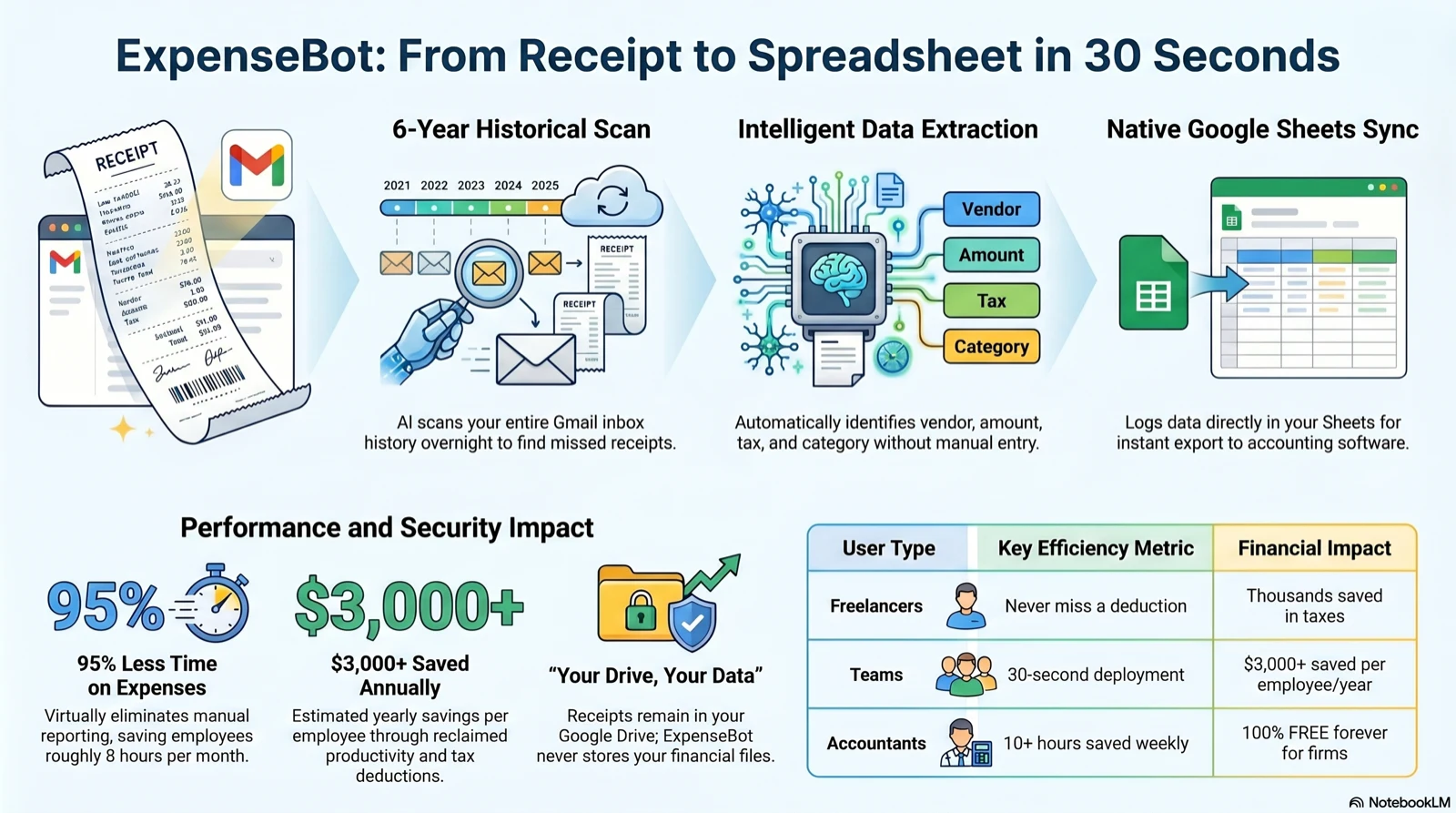
How ExpenseBot turns a Gmail inbox into an organized expense spreadsheet
2. Expensify — Best for Established Teams
Expensify is the most well-known name in expense management, and for good reason. SmartScan OCR handles photo receipts with claimed 99% accuracy, and you can forward email receipts to receipts@expensify.com for automatic processing (up to 10 receipt images per email).
Where Expensify really shines is team features: approval workflows, corporate card reconciliation, bank feed integration, and reimbursement processing. If your company needs managers to approve expenses before reimbursement, Expensify handles that out of the box.
Pricing: Free plan with 25 SmartScans/month. Collect plan at $5/user/month. Control plan at ~$9/user/month with approval workflows and advanced features.
Pros:
- Most established brand in expense management
- Bank feed and corporate card integration
- Approval workflows for teams
- Reimbursement processing
- Wide accounting software integration (QuickBooks, Xero, NetSuite)
Cons:
- Data stored on Expensify's servers (not yours)
- Email receipts require manual forwarding — no automatic inbox scanning
- Pricing has become more complex (tiered plans, per-user pricing with minimum commitments)
- No native Google Sheets integration (requires Zapier)
- Handwritten and non-English receipts still need a manual check — true of every tool on this list
Best for: Mid-size teams that need approval workflows, corporate card management, and don't prioritize Google Workspace integration. See our detailed Expensify vs ExpenseBot comparison.
3. Dext (formerly Receipt Bank) — Best for Accountants
Dext is the tool accounting firms recommend to their clients. It's designed from the ground up for multi-client document management — accountants can manage dozens of businesses from a single dashboard, each with their own document feeds and expense categories.
Receipt submission is flexible: email forwarding, WhatsApp, mobile app, drag-and-drop web upload, and Dropbox integration. Dext claims 99.9% data extraction accuracy across 320+ million documents processed annually.
Pricing: Business plans start at ~$31.50/month for 5 users (250 documents included). Practice plans for accountants start at ~$239/month for 10 clients. Annual billing saves 13–20%.
Pros:
- Built for accounting firms managing multiple clients
- Excellent extraction accuracy
- Direct integrations with Xero, QuickBooks, Sage, and 11,500+ bank feeds
- Multiple document submission methods
Cons:
- Expensive — especially for solo freelancers
- Enterprise-focused pricing and features
- No native Google Sheets integration (Zapier or Make required)
- Overkill if you're a one-person operation
Best for: Accounting firms and bookkeepers managing multiple clients. If your accountant told you to use Dext, it's probably because it integrates well with their workflow.
4. Shoeboxed — Best for Paper Receipt Backlog
Shoeboxed has a unique value proposition: they'll literally scan your physical receipts for you. Their "Magic Envelope" service lets you mail in a prepaid envelope stuffed with paper receipts, and Shoeboxed's team digitizes, human-verifies, and tax-categorizes each one.
They also have a mobile app for photo capture and Gmail Receipt Sync for email receipts. But the mail-in service is what makes Shoeboxed different — if you have years of paper receipts in a drawer (or a literal shoebox), this is where to start.
Pricing: Free DIY plan (5 e-receipts/month). Lite at $15/month (50 documents). Classic at $39/month (150 documents, prepaid envelopes). Business at $69/month (500 documents). Executive at $125/month (1,000 documents).
Pros:
- Mail-in scanning service handles your paper receipt backlog
- Human-verified — not just OCR
- IRS-accepted documentation
- Gmail Receipt Sync for email receipts
Cons:
- Mail-in turnaround is 1–5 days depending on plan
- Gets expensive at higher volumes
- Limited accounting software integrations compared to Expensify or Dext
- No native Google Sheets — CSV export only
Best for: Anyone with a physical pile of paper receipts who wants someone else to handle the scanning. Start here, then switch to an automated solution like ExpenseBot for ongoing receipt capture.
5. Smart Receipts — Best Free / Open-Source Option
Smart Receipts is free, open source (AGPL 3.0), and doesn't require an account to use. All data stays on your device by default — no cloud, no account, no tracking. It's the most privacy-friendly option on this list.
The app handles photo receipt capture, PDF import, expense report generation, and basic mileage tracking. The paid Smart Receipts+ plan ($9.99/month) adds enhanced OCR capabilities. But there's no email receipt scanning, no cloud sync, and no AI categorization.
Pricing: Free (core app). Smart Receipts+ at $9.99/month for enhanced OCR.
Pros:
- Completely free for core features
- Open source — full transparency, no vendor lock-in
- Offline-first, all data on your device
- No account required
- Exports to PDF, CSV, and ZIP
Cons:
- Everything is manual — no email scanning, no auto-categorization
- No cloud sync between devices
- No accounting software integrations
- No Google Sheets integration
- Not suitable for teams
Best for: Privacy-conscious individuals who want a simple, free receipt tracker and don't mind manual entry.
6. Veryfi — Best for API / Developer Integration
Veryfi is an OCR powerhouse. Its AI processes receipts, invoices, bills, and checks in real-time without templates — it works on any document format. Each user gets a unique @veryfi.cc email address for forwarding receipts.
The real draw is the API. Developers can integrate Veryfi's OCR engine into their own applications with comprehensive documentation and SDKs. The consumer app is solid, but the pricing structure reflects its developer-first DNA.
Pricing: Free plan (50 documents/month). Prime plan at $19.99/user/month ($17.50 annually). API plans start at ~$500/month for high-volume processing.
Pros:
- Powerful OCR API with real-time processing
- Works on any document format — no templates needed
- No human-in-the-loop — fully automated AI
- Generous free tier (50 docs/month)
- Email forwarding for receipt capture
Cons:
- Consumer app pricing is high compared to alternatives
- Developer-focused — not the most user-friendly for non-technical people
- No native Google Sheets integration
- API pricing gets expensive at scale
Best for: Developers who want to integrate receipt OCR into their own applications, or technically savvy users who value Veryfi's extraction accuracy.
7. Zoho Expense — Best for Zoho Ecosystem
If your business already runs on Zoho (Zoho Books, Zoho CRM, Zoho Projects), then Zoho Expense is the obvious choice. It shares login, contacts and books with the rest of the suite, which removes the integration work the other options need, and it sits at the low end of the market on price.
Receipt Autoscan reads receipts in 30+ languages and extracts merchant, date, amount, tax, and currency. There's a Gmail add-on that extracts receipt details directly from your inbox, plus a forwarding email address for auto-scan. The free plan supports up to 3 users with 20 receipt scans per month.
Pricing: Free for up to 3 users (20 scans/month). Standard at $3/user/month. Premium at $5/user/month. Enterprise at $8/user/month.
Pros:
- Very affordable — best price-per-user on this list
- Deep Zoho ecosystem integration (Books, CRM, Projects, People)
- Generous free plan (3 users)
- Gmail add-on for email receipt extraction
- Multi-language OCR (30+ languages)
Cons:
- Limited value outside the Zoho ecosystem
- Google Sheets integration requires Zoho Flow setup
- Receipt scanning is basic compared to Dext or Veryfi
- Minimum 3 users on paid plans
Best for: Small businesses already paying for Zoho. It shares login, contacts and books with the rest of the suite, so there is no integration work to do.
Already have years of receipts in your Gmail?
ExpenseBot finds them automatically — no forwarding, no manual entry.
Finds Amazon, Uber, airlines, hotels, SaaS & more · 60-day free trial
How Receipt Scanners Actually Differ
Every app on this list can read a receipt. Comparison posts spend most of their words on OCR accuracy, and it is close to the least useful axis in 2026 — the models are good enough that the difference rarely decides anything. The axis that actually decides whether a system survives contact with a busy quarter is how the receipt gets in. There are three ways a receipt gets in, and most tools do more than one:
1. You photograph each receipt
The default for Smart Receipts, and an option in all seven. It works well for paper — a taxi, a coffee, a hardware store — and fails quietly for everything else, because most business spending in 2026 never produces a piece of paper to photograph. It also depends entirely on you remembering at the moment of purchase, which is the single biggest source of missed deductions.
2. You forward each receipt to an address
Expensify, Dext, Veryfi and Zoho all provide a dedicated intake address. This handles email receipts, but it inherits the same weakness: it is triggered by you. It also does nothing for the receipts already sitting in your inbox — forwarding is a going-forward-only habit, so the moment you set it up, everything before that date stays unfiled. Setting up an auto-forward rule helps for the future and still leaves the back catalogue untouched.
3. The tool reads the mailbox and finds them
Shoeboxed offers a Gmail sync and Zoho a Gmail add-on; ExpenseBot is built around this model rather than offering it as a side channel. The practical difference is retroactivity — because the tool searches mail that is already there, receipts from before you signed up are in scope, not just new ones. That matters most in the two situations people actually shop for these tools in: filing a return for a year that has already ended, and reconstructing records for an audit or a loan application.
The trade-off is real and worth stating plainly: mailbox-reading requires granting access to your email, and it can only find spending that generated an email in the first place. Cash purchases and paper-only receipts still need a photo. Most people end up using two of the three models, not one.
Whether this model suits you depends less on the tool than on where your spending actually lands. It is worth checking how a given merchant's receipts behave before you commit — we've written up the awkward ones separately: Gmail receipts generally, Amazon orders (one email, several orders), Apple purchases (one charge, several items), and photo capture on an iPhone for everything that never generates an email at all. For a receipt that is already lost rather than one you still have, looking up a Walmart receipt walks through what retailer-side recovery involves. A wider set of head-to-heads lives on our comparisons page.
What to Look For in 2026
Beyond capture model, five things separate a tool you will still be using next year from one you will abandon in March:
- Retroactive capture. Can it go and find last year's receipts, or does it only start counting from today? This is the difference between solving your problem and solving your problem starting next quarter.
- Multi-currency handling. If you bill or buy across borders, check whether the tool records the original currency and amount rather than silently converting — your accountant will need both.
- Audit-readiness. A total is not a record. What survives scrutiny is the image or source document kept alongside the amount, date, vendor and business purpose. Ask what the tool retains, not just what it displays.
- Export shape. Getting a CSV out is table stakes. The question is whether the export matches the shape your accountant or accounting software actually wants — a general-ledger-coded export saves hours that a raw dump does not.
- Data ownership and exit. If you stopped paying tomorrow, what happens to five years of records? Tools that write into storage you already own behave differently here from tools that hold your archive on their servers. Check the export-out path before you need it.
How to Choose the Right Receipt Scanner
There's no single "best" receipt scanner — it depends on your workflow. Here's a simple decision tree:
- Do you use Gmail or Google Workspace? → ExpenseBot. Automatic scanning, Google Sheets native, data in your Drive.
- Do you need team approval workflows? → Expensify. Built for teams with managers, corporate cards, and reimbursement.
- Does your accountant choose your tools? → Ask about Dext. It's what most accounting firms recommend.
- Do you have a physical pile of paper receipts? → Shoeboxed first (mail them in), then switch to an automated tool for ongoing capture.
- Are you a developer? → Veryfi API for custom integration.
- Already on Zoho? → Zoho Expense. Best price-per-user and deep ecosystem integration.
- Want free and don't mind manual entry? → Smart Receipts. Open source, offline, no account needed.
Whichever app you choose, start now — not in April. The single biggest mistake freelancers make is waiting until tax season to organize receipts. If you have years of email receipts in Gmail, ExpenseBot can scan all of them in one afternoon. For mileage deductions, see our 2026 IRS mileage rate guide.
Also worth considering: if you use Google Sheets for expense tracking, ExpenseBot is the only option on this list that writes directly to Sheets without Zapier or CSV export. You can start with our free expense tracker template and upgrade to automated scanning when you're ready.
Shoeboxed vs Expensify: Which Should You Pick?
These two tools come up together constantly because they target opposite ends of the same problem. Shoeboxed is a paper-first digitization service; Expensify is a policy-engine for corporate T&E. Picking between them depends entirely on what kind of receipts you're drowning in and who's paying for what.
Pricing
Shoeboxed is priced in flat monthly tiers by document volume, with the physical mail-in "Magic Envelope" — where Shoeboxed's team scans your paper receipts for you — reserved for the higher tiers.
Expensify is priced per active user with a limited free tier, and has separate plan levels for basic collection versus approval controls and the Expensify Card. Per seat it lands below Shoeboxed's flat rate for a single user and overtakes it once you add a team. Both vendors restructure their tiers regularly — compare on their own pricing pages.
Scanning method
Shoeboxed is designed around the physical receipt. You either mail paper in via the prepaid Magic Envelope or photograph with their app. Human verification ships with the higher tiers — a real person checks the OCR output, which is why Shoeboxed ranks highest for accuracy on faded or damaged receipts. The trade-off: turnaround on mail-in is days, not seconds.
Expensify is designed around the photo-plus-cardworkflow. SmartScan extracts details from a phone photo in about a minute; the Expensify Card auto-reconciles transactions so you only photograph the receipt for audit documentation. There's no mail-in option. Email forwarding works (to receipts@expensify.com), but their strength is the mobile-app snap flow feeding a policy engine.
Best-for personas
Pick Shoeboxed if: you're a solo CPA, a small-practice bookkeeper, or a sole proprietor with a backlog of paper — drawer full of thermal receipts, shoebox of gas slips, envelopes of client dinners. The mail-in service is what nothing else on this list replicates. It's also the right answer for anyone who just can't bring themselves to use a mobile app for receipt capture.
Pick Expensify if: you run a team with a real approval workflow — manager sign-off, policy rules, per-diem enforcement, corporate card reconciliation, multi-step expense reports, NetSuite/QuickBooks sync at volume. This is the tool for the finance team that already said "no" to spreadsheets. It over-serves a freelancer and under-serves someone with paper.
Verdict
If the question is literally "Shoeboxed vs Expensify" — paper in, team T&E out — they're both fine at their own end of the spectrum. Shoeboxed wins for sole proprietors with physical paper. Expensify wins for teams with policy. Neither is the right answer if your actual problem is that receipts arrive in Gmail and you don't want to forward them anywhere, snap photos of PDFs you already have, or pay per-user for a tool you could deploy to yourself for free.
That's the gap where a third option matters. ExpenseBot reads your Gmail nightly, pulls receipts out of invoice emails and their PDF attachments directly, and drops them into a Google Sheet that you own. No Magic Envelope, no mobile-first workflow to adopt, no per-seat pricing to expand as you hire. For a solo founder, freelancer, or small team where most receipts already land in an inbox, that's a better starting shape than either Shoeboxed or Expensify. See our Expensify alternative comparison for the full head-to-head, jump to AI expense tracker for how the Gmail auto-scan works, or see the receipt organizer app overview — the searchable archive that sits behind every capture method.
What Makes a Receipt Scanner an AI Receipt Scanner
An AI receipt scanner is software that reads a photo, PDF or emailed receipt and extracts the merchant, date, total and tax as structured fields, then files them — instead of you typing them in. That is the whole of what "AI" means in this category. It is automated extraction and categorisation, not judgement, and any product implying otherwise is overselling.
The distinction that actually matters when comparing them is OCR versus extraction. Optical character recognition turns the pixels into text. Extraction decides which of that text is the merchant, which number is the total rather than the subtotal or the tip, and which line is tax. A tool that does OCR alone hands you a searchable image; a tool that does extraction hands you a row of data. Everything on this list does extraction — but they are not equally good at it, and the failure modes differ.
Six things worth checking before you trust one:
- Line items or total only. Some scanners capture just the merchant, date and total. Others break out each line. If you need to split a Costco run between business and personal, or code a hardware-store receipt across two jobs, total-only capture will not do it.
- Where the receipts come from. Photo capture assumes you remember to photograph the receipt. Email scanning finds the ones you never thought about — most business spend now arrives as an emailed confirmation, not a slip of paper.
- Multi-currency handling. If you travel or buy from foreign suppliers, check whether the tool records the original currency and the converted amount, and which exchange rate it used on which date. A converted figure with no recorded rate cannot be reconciled later.
- Duplicate detection. The same purchase often arrives twice — an emailed confirmation and a photographed receipt, or an order confirmation and a shipping notice. Without de-duplication you get inflated totals that are tedious to unpick at year end.
- The correction path. Extraction will be wrong sometimes. Ask how you see what was extracted, how many clicks it takes to fix a wrong amount or category, and whether you can correct many rows at once. This is the single biggest difference in day-to-day experience between these products.
- Where the data lands, and who owns it. Some tools keep your records inside their platform, reachable through their export. Others write to storage you already control. This decides what you still have if you stop paying — see the ownership column in the comparison table above.
ExpenseBot is an AI receipt scanner that reads receipts out of Gmail automatically and writes the extracted expenses into a Google Sheet in the user's own Google Drive. Extraction covers the merchant, date, total and tax; duplicates arriving from more than one source are collapsed; and every extracted row can be reviewed and corrected, in bulk, before it counts toward a report. For how the automatic Gmail side works, see AI expense tracker.
Receipt Scanning Inside Accounting Software vs a Dedicated Capture Layer
Most accounting packages now include receipt scanning — QuickBooks, Xero, FreshBooks and Zoho Books all capture a receipt image and attach it to a transaction. If you already run one of them and your volume is low, that built-in capture may be all you need, and adding another tool is not an improvement.
The case for a dedicated spend capture layer is volume and sourcing. Accounting software is built around the transaction: something is entered, and a receipt gets attached to it. A capture layer works the other way round — it goes looking for the evidence first, across an inbox and a camera roll, and produces the records. When most of your spend arrives as emailed confirmations that nobody will manually upload, that difference is the whole ballgame. It is also why the two coexist comfortably: capture at the front, ledger at the back.
The practical test is simple. If your receipts reliably get into your accounting software today, you do not need a separate scanner. If you reach year end and discover months of spend that never made it in, the gap is capture, and no amount of accounting software fixes it.
What Happens to the Receipts You Already Have
Most people reading a receipt scanner comparison are not starting from zero. They have months, sometimes years, of receipts already sitting in Gmail, and the first question is whether a new app does anything about those.
For most of the tools above, the answer is no. A photo app only sees what you photograph from today, and a forwarding address only sees what you forward from today, so the backlog stays exactly where it is. A tool that reads the mailbox can go back through mail that is already there. With ExpenseBot, a subscription covers the current calendar year, and each completed prior year is a one-time unlock scanned one year at a time. The Gmail receipt scanner page explains how the scan decides what counts as a receipt.
"Saved THOUSANDS in tax deductions. The system recovered nearly 10,000 purchase receipts across 6 years from email, properly categorized as tax deductions, resulting in substantial savings."
Brian Wise, Business Owner, review on Trustpilot